⇩
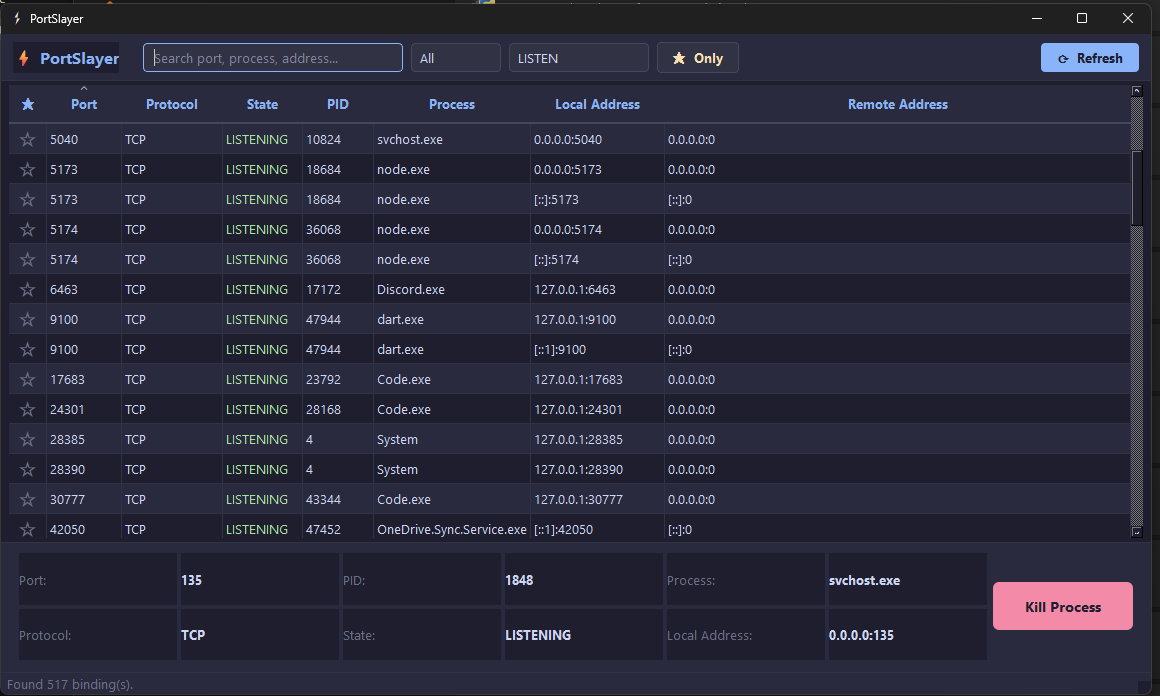
Interactive TUI Dashboard
Run pk with no arguments for a full-screen, keyboard-driven view of every listening port.

 Appesto
Software Solutions
Appesto
Software Solutions
Cross-platform CLI + interactive TUI to list and kill processes by port.
Fast, safe and simple port management from the terminal.
PortSlayer is 100% free and open source under the MIT license — install it in seconds, read every line of the source, or send a pull request.
Every developer knows the moment: you try to start a dev server and get slapped with Error: address already in use :3000. Somewhere, an old Node process, a zombie Python server, or a forgotten Docker proxy is still holding that port hostage — and normally you'd have to dig through lsof, netstat, or Task Manager just to find out what, let alone kill it safely.
PortSlayer (pk) is a free, open-source CLI and terminal dashboard that finds and kills whatever is squatting on your ports — in seconds. Run pk with no arguments for a full-screen, keyboard-driven dashboard — arrow keys to navigate, / to search, k to kill with confirmation — or script it from the CLI with JSON output. Free and open source under MIT, for Windows and Linux.
It's built for the moments that actually slow developers down: freeing a stuck port before a demo, cleaning up after a crashed test run, or scripting port cleanup into a CI pipeline. Every kill asks for confirmation by default, so you never terminate the wrong process by accident.
Everything you need to manage ports, right from your terminal.
Run pk with no arguments for a full-screen, keyboard-driven view of every listening port.
Search by port fragment instead of exact numbers.
pk find 808Skip the port lookup entirely and terminate by process name.
pk kill --name nodeMachine-readable output for scripting, CI checks, and automation pipelines.
pk list --jsonTab-complete commands and flags in your shell with a single setup command.
pk --install-completionEvery kill asks for confirmation unless you pass --force, with no shell injection surface.
Explore the actual product interface.
READY TO IMPROVE YOUR WORKFLOW?